
Why a VPN Is Not Complete Online Anonymity
Virtual Private Networks (VPNs) have become a household staple for digital privacy. Marketed heavily as silver bullets for online confidentiality, millions rely on them to mask their digital footprints, bypass regional restrictions, and secure their internet traffic on public Wi-Fi. However, a widespread misconception persists: many users believe that toggling on a VPN renders them completely anonymous, invisible to trackers, and immune to surveillance.

The reality is far more nuanced. A VPN is a powerful tool, but it constitutes only one single layer of a comprehensive privacy strategy. To truly understand digital privacy, we must look beyond the encrypted tunnel and examine the myriad ways our devices, browsers, and behaviors continue to leak identifying information.
—
The Core Function: What IP Masking Actually Does
To understand why a VPN falls short of total anonymity, we must first understand what it actually achieves. When you browse the web normally, your Internet Service Provider (ISP) assigns your device a public Internet Protocol (IP) address. This address acts like a digital mailing address, revealing your rough geographic location and allowing websites to route data back to your screen.
When you activate a VPN, your traffic is encrypted and routed through an intermediate server managed by the VPN provider. Websites you visit see the VPN server's IP address rather than your own. This process—IP masking—successfully shields your physical location and prevents your ISP from logging the specific websites you visit.
However, IP masking only changes where you appear to be coming from. It does not change who you are or how your browser behaves once you arrive at a website.
—
The Achilles' Heel: DNS Leaks
Even with a VPN active, your operating system constantly handles Domain Name System (DNS) requests, translating human-readable website names (like example.com) into machine-readable IP addresses.
If your device accidentally sends these requests outside the encrypted VPN tunnel—often due to misconfigurations, network switching, or operating system quirks—you experience a DNS leak. When this happens, your ISP or local network administrator can see every single domain name you are trying to visit, completely bypassing the privacy benefits of your VPN.
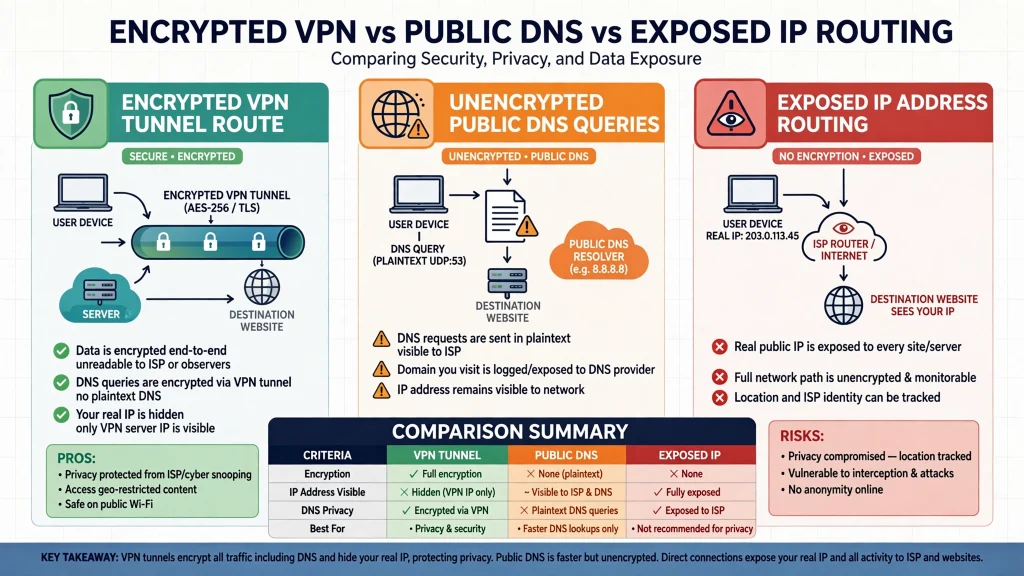
Protecting against DNS leaks requires robust client software equipped with leak protection, kill switches, and sometimes manual configuration to ensure that all DNS queries route exclusively through the VPN provider's private DNS resolvers.
—
Beyond IP: Browser Fingerprinting
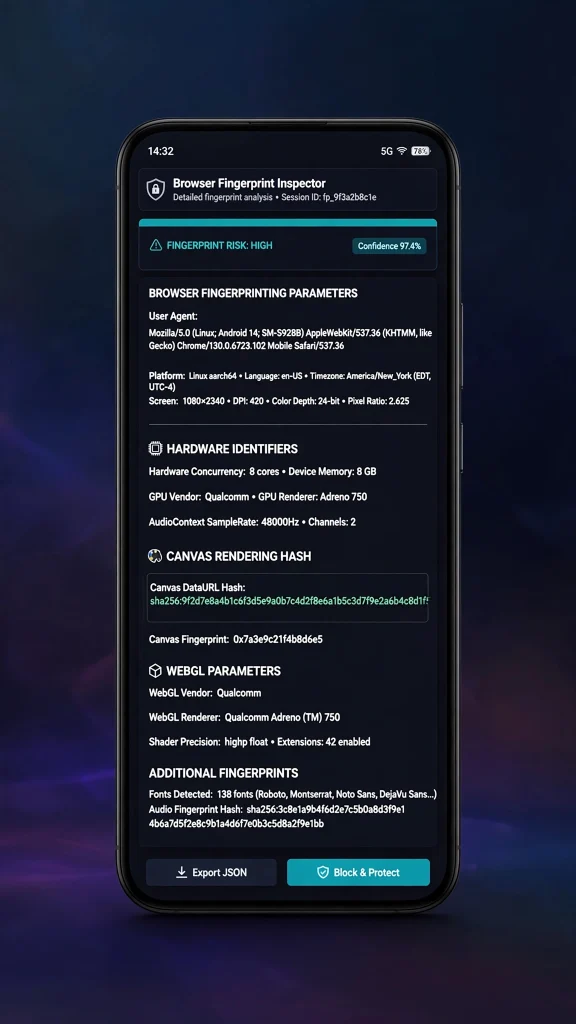
Perhaps the most sophisticated threat to online privacy is browser fingerprinting. While cookies can be cleared and IP addresses can be masked, your browser and device emit a vast amount of ambient technical data simply by functioning normally.
Websites can query your browser for:
- Screen resolution and color depth
- Installed fonts and extensions
- Audio processing capabilities
- Hardware concurrency (CPU cores)
- Graphics card rendering details (WebGL/Canvas)
- Operating system version and language settings
When combined, these seemingly mundane data points form a unique digital fingerprint. Studies show that a modern browser's fingerprint is often distinct enough to identify an individual user across the web with astonishing accuracy, even if they use a VPN, clear their cache, and block third-party cookies.
—
Cookies and State Management
Cookies are small text files stored on your device by websites to remember your preferences, session status, and shopping carts. While first-party cookies help websites function, third-party tracking cookies have historically been used by advertising networks to track users across disparate domains.
| Tracking Mechanism | What It Targets | VPN Protection Level |
|---|---|---|
| IP Address | Network location & ISP routing | Fully Masked |
| DNS Requests | Domain name lookups | Protected (unless leaked) |
| Browser Fingerprint | Hardware & software configuration | Unprotected |
| Cookies / Local Storage | Session state & site preferences | Unprotected |
| Account Logins | Verified personal identity | Unprotected |
Even if your IP address is masked by a VPN, logging into a website that sets tracking cookies immediately ties your browsing session to your persistent profile. If you accept cookies or store local data, trackers easily bridge the gap between your encrypted tunnel and your real identity.
—
The Ultimate De-Anonymizer: Account Logins
Perhaps the most glaring reality check for VPN users is the account login.
Imagine connecting to a premium VPN server in another country, completely cloaking your IP address, and then logging into your personal Google, social media, or banking account. At that exact moment, the illusion of anonymity evaporates. The service provider now knows precisely who you are, tying your verified identity, email address, and real-world payment details directly to your current browsing session.
A VPN protects your traffic from network-level eavesdropping (such as hackers on public Wi-Fi or monitoring by your ISP), but it does not grant anonymity from the specific platforms and applications you voluntarily log into.
—
Building a Multi-Layered Privacy Strategy
Achieving robust digital privacy requires moving past the mindset that a single tool can solve every vulnerability. Because every layer of the internet stack exposes different metadata, a resilient defense strategy must be multifaceted.

To complement your VPN, consider integrating these additional practices:
- Use Privacy-Focused Browsers: Utilize browsers specifically engineered to resist fingerprinting and block trackers by default (such as hardened Firefox or Tor Browser for high-risk threat models).
- Enforce Strict Cookie Management: Regularly clear site data, block third-party tracking cookies, and use container tabs to isolate your browsing sessions.
- Audit DNS Settings: Routinely test your connection for DNS and WebRTC leaks using independent diagnostic tools.
- Minimize Account Linking: Avoid logging into personal accounts on browsing profiles dedicated to independent research or sensitive activities.
Conclusion
VPNs remain indispensable tools for securing data in transit and hiding physical locations from untrusted networks. However, they are fundamentally network-layer tools designed for confidentiality, not absolute anonymity. By understanding browser fingerprinting, managing cookies, preventing DNS leaks, and recognizing the impact of account logins, users can build a realistic, multi-layered approach to safeguarding their digital lives.